Advanced Real-Time Rendering in OpenGL
A Physically-Based Approach for Games
Motivation
Modern game engines rely on physically accurate simulations of light and material interactions to achieve realism. This is especially important for AAA games, VR applications, and simulations where immersion depends heavily on how materials respond to changing lighting conditions.
In this project, my goal was to implement a real-time physically based rendering (PBR) pipeline using OpenGL. Unlike traditional Phong or Blinn-Phong shading models, PBR is based on physical principles and energy conservation laws. It better simulates phenomena like roughness-dependent specular reflection, metallic surfaces, and environment-based lighting using real-world light probes.
By building this system from scratch with OpenGL, GLSL, and C++, I seek to understand:
- How the graphics pipeline processes and shades geometry
- How physically based models can be applied in real-time scenarios, using self-made 3D models as focus point
- How shaders and framebuffer objects (FBOs) can be orchestrated to simulate global illumination and parallax effects
Problem Statement
The objective of this project is to develop a modular real-time rendering framework capable of rendering realistic materials using physically based shading models, enhanced by image-based lighting (IBL) and parallax occlusion mapping.
More specifically:
- Simulate direct and indirect lighting using BRDFs and light probes
- Implement real-time reflection and refraction using environment cubemaps
- Simulate microgeometry and surface depth using normal and height maps
- Render the scene using modern OpenGL (core profile), using shaders, VAOs, VBOs, and framebuffer attachments
This involves implementing the entire IBL pipeline in OpenGL, generating irradiance maps, prefiltered environment maps, and BRDF lookup textures, all of which are then used in a fragment shader to shade PBR 3D models.
Theoretical Foundations
1. Physically Based Rendering (PBR)
This involves implementing the entire IBL pipeline in OpenGL, generating irradiance maps, prefiltered environment maps, and BRDF lookup textures, all of which are then used in a fragment shader to shade PBR 3D models.
1.1 Bidirectional Reflectance Distribution Function (BRDF)
The BRDF equation defines how light is reflected at an opaque surface:
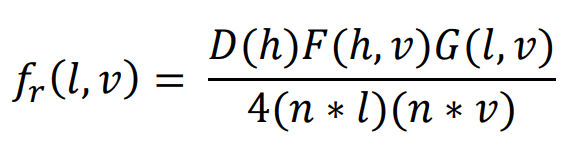
Where:
- D(h): Normal Distribution Function (GGX)
- F(h,v): Fresnel term (Schlick’s approximation)
- G(l,v): Geometry function (Smith’s method)
In the shader (pbr.frag), these are implemented as:
- DistributionGGX for 𝐷(ℎ)
- GeometrySmith using Schlick-GGX
- FresnelSchlick for F
These functions are embedded in GLSL fragment shaders. Per-pixel normals are fetched from a normal map and transformed into world space. Tangent-to-world matrices are calculated on the GPU to perform this transformation.
2. Image-Based Lighting (IBL)
Traditional real-time lighting uses point or directional lights. IBL simulates indirect lighting from the environment, capturing complex light contributions from all directions.
2.1 Environment Map
In OpenGL, an HDR.ℎ𝑑r image is first loaded into a 2D texture (equirectangular projection). An offscreen rendering pass (equirectangular_to_cubemap.frag) is used to convert this into a cubemap texture using framebuffer rendering to six views.
2.2 Diffuse Irradiance Map
Used to approximate diffuse lighting:

This is computed in irradiance_convolution.frag, where the cubemap is sampled using a cosineweighted distribution. The result is a blurred cubemap representing low-frequency lighting.
2.3 Prefiltered Specular Map
Specular reflections depend on surface roughness. Instead of computing convolution per frame, we prefilter the cubemap for several roughness values and store them in mipmap levels.

In prefilter.frag, we sample the environment with importance sampling (based on GGX) and store results into a cubemap with multiple mipmap levels.
2.4 BRDF Integration Lookup Texture
Computing the full specular IBL integration every frame is expensive. Instead, a 2D BRDF LUT is generated and stored as a texture using brdf.frag.
This LUT contains precomputed integrals of the Fresnel and geometry terms as a function of:
- NdotV (view angle)
- roughness
In the PBR shader, this is used as:

3. Parallax Occlusion Mapping
Problem: Textures are flat, but we want to simulate 3D depth with displacement effects.
Solution: Use a height map to offset the texture coordinates based on the view direction4
Steps in parallax_mapping.frag:
- Convert view direction to tangent space using the TBN matrix
- Step through the depth texture (height map) along the view vector
- Perform ray-height intersection via linear search
- Offset the texture coordinate to simulate depth
OpenGL-specific considerations:
- Requires a normal map and height map bound to texture units
- TBN matrix can be passed per-vertex or calculated per-fragment
- Height scale is passed as a uniform to control the effect intensity
This method simulates complex surfaces like bricks, cobblestones, and carved wood without any extra geometry.
4. Skybox Rendering
The background of the scene is rendered using a cube textured with the environment map.
Steps:
- Disable depth writing: glDepthMask(GL_FALSE)
- Use a shader (background.frag) that transforms view direction into texture coordinates
- Always render skybox cube around the camera origin to ensure infinite appearance
This ensures the environment lighting, and the visible background are always consistent.
5. Framebuffer Workflow (Render Pipeline)
Rendering passes:
- Equirectangular → Cubemap
- Input: HDR 2D texture
- Output: Environment cubemap
- Cubemap → Irradiance Map
- Input: Environment cubemap
- Output: Diffuse lighting map
- Cubemap → Prefiltered Map
- Output: Mipmap chain of cubemaps for different roughness levels
- BRDF LUT
- Input: None
- Output: 2D lookup texture (stored in RG format)
These passes are done off-screen using framebuffer objects (FBOs), where each result is written to a texture for later use in the final PBR shader.
Settings and User Controls
The project includes a real-time graphical user interface (GUI) that allows the user to interactively modify rendering parameters. This enables real-time experimentation with lighting, material response, and viewing conditions, essential for tuning physically based rendering. The interface is built using IMGui.
Parallax Mapping:
- Controls the depth effect of Parallax Occlusion Mapping
- Affects how strongly the height map displaces texture coordinates
- Lower values produce subtle depth; higher values exaggerate the 3D illusion
Material Selection:
- Let the user choose between different preset materials for the plane containing parallaxing (e.g., concrete, sand)
Gamma Correction:
- Adjusts gamma correction applied to the final image
- Common values for reference: 1.0 (no correction), 2.2 (sRGB standard)
- Important for perceptually accurate brightness and color rendering
Light Settings:
- Defines the color of the main point light
- Fully white light in this case (no tinting)
Light Position:
- Controls the position of the scene's main light source in 3D space
- Affects direction of shadows, specular highlights, and shading orientation
Object (Chest) Position:
- Controls the world position of the 3D model
- Useful for testing lighting interaction with models
Environment Map Selection:
- Let the user see the different maps used to compute the image-based lighting (IBL)
Future Work
With more time, I would:
- Add shadow maps for directional lights and more realistic shadows
- Implement post-processing pipeline with different effects
- Try out some particle effects to pair with the PBR materials
- Try to benchmark the current scene with many models using PBR